How to Check Nol Card Balance in Dubai
Standing at a Dubai Metro gate with a card that won’t tap through is a familiar moment for anyone new to the city, and it almost always comes down to one thing: the Nol card’s balance dropped below the minimum needed to travel. The fastest fix is knowing where to check that balance before you’re already at the barrier, and RTA gives commuters several genuinely different ways to do it, not just one.
Quick answer: the fastest way to check a Nol card balance is to tap the physical card against any Ticket Vending Machine or gate reader at a Metro, Tram or bus station — it shows the live figure straight from the card’s chip in a couple of seconds. If you’re not near a station, the S’hail or Nol Pay app, a text to 511, or RTA’s own nol.rta.ae website all work just as well from home or on the move. This guide walks through every method, what the minimum balance actually needs to be, why the number on your app sometimes doesn’t match the gate, and where to top up once you know where you stand.
Why the Balance Matters More Than It Seems
RTA requires a minimum balance of AED 7.50 on a Nol card before it will let you through a Metro or Tram gate, and buses apply their own minimum fare deduction at check-in too. A card sitting just under that threshold gets rejected at the gate even if it still shows a small positive balance — which is the single most common reason commuters get stuck mid-journey without realising their card was already running low. It happens just as often to someone tapping through Union Station on the Red Line as it does to a first-time visitor trying to get from Dubai Airport Terminal 3 into town, so it’s worth checking your balance before you travel, not after the gate says no.
Every Way to Check a Nol Card Balance in Dubai
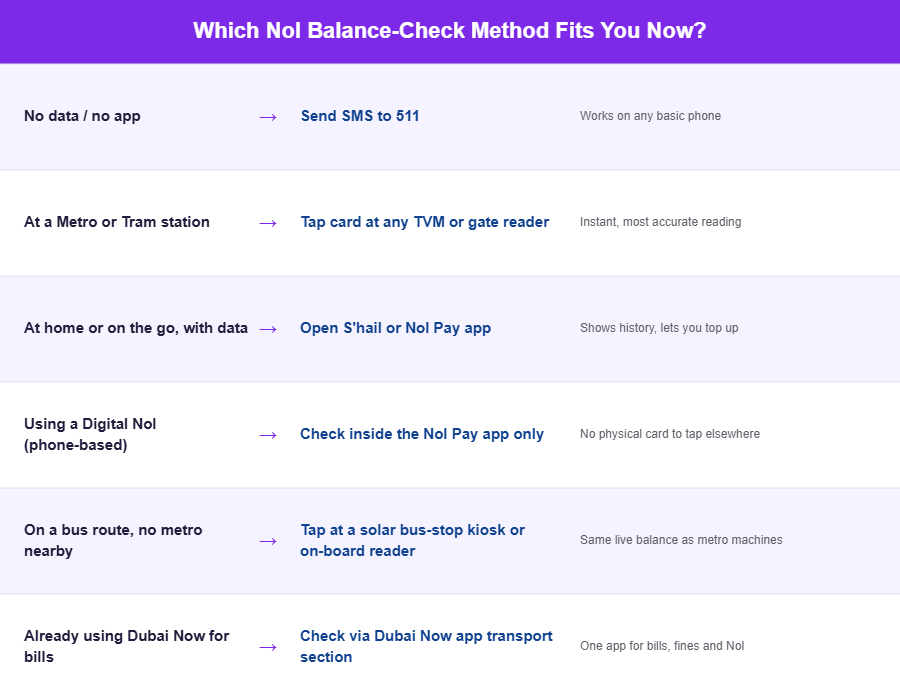
There isn’t one “correct” method — the right one depends on whether you’re at a station, at home, offline, or already carrying a digital Nol on your phone. Here’s the full picture, starting with the one most people reach for first.
Method 1: Metro, Tram and Bus Station Kiosks
Every Dubai Metro and Tram station has ticket vending machines and dedicated card readers where tapping or inserting a Nol card instantly displays the current balance on screen — no app, login, or data connection required. This is the most accurate reading you can get, because it comes straight from the card’s own chip rather than a server that syncs periodically. It’s also the most reliable fallback for anyone without a smartphone on hand, or for a visitor using a Red Ticket who just wants a quick check before boarding at, say, Mall of the Emirates or BurJuman.
Method 2: SMS Balance Check (No App or Data Needed)
If you don’t have mobile data or simply prefer not to open an app, send a text with your Nol card’s 10-digit Tag ID (printed on the back of the card) to 511. You’ll get an automated reply with the current balance. It’s slower than tapping at a machine and depends on your operator’s SMS delivery, but it’s the only method that works on a basic phone with no internet at all — useful for a visitor on a local SIM without a data plan, or a resident whose phone has simply run out of data mid-month.
Method 3: RTA’s S’hail App
S’hail is RTA’s official mobile app and the most convenient way to check a Nol card balance without going anywhere near a station. Registering the physical card number inside the app lets you view the current balance, recent trip history, and top up directly from a linked payment card — all from a phone screen whether you’re at home in Al Barsha or waiting for a bus in Deira.
Method 4: Nol Pay App (Including NFC Tap)
Nol Pay, RTA’s dedicated payments app, is built specifically around Nol card and digital Nol functionality: balance checks, top-ups, and converting a phone into a digital Nol card entirely. Many phones let you check the balance without even opening a menu — just hold the physical card against the back of an NFC-enabled phone with the app open, and the balance appears within a second or two. For commuters who’ve moved to a fully digital Nol, this app is effectively the only place the balance lives, since there’s no physical card to tap at a kiosk.
Method 5: RTA’s Official Website (nol.rta.ae)
RTA also runs a dedicated Nol portal at nol.rta.ae, reachable through the “Nol Card” section of rta.ae, where entering the card’s Tag ID brings up the balance, pending credit, and expiry date without installing anything. It’s a solid option from a desktop or laptop — useful if you’re topping up a family member’s card while sitting at a computer rather than reaching for a phone.
Method 6: Bus Station Readers and Solar-Powered Kiosks
Major bus stations, including solar-powered ticket machines at some bus stops, also display balance information when a card is tapped or inserted, extending the same convenience beyond Metro stations to commuters relying mainly on Dubai’s bus network across areas like Al Qusais or Karama.
Method 7: Dubai Now App
The Dubai Now app, the emirate’s broader government services app, includes Nol card balance checking and top-up as one of its many integrated services — genuinely useful for residents who already use it for utility bills or traffic fines and would rather not install a separate app just for transport.
Still Stuck? Call RTA Directly
If none of the above works — a lost Tag ID, an app that won’t sync, or a card that machines won’t read — RTA’s customer service line can look up the balance for you directly. The 24/7 hotline is 800 9090 (within the UAE) or +971 4 605 1414 from outside the country.
Nol Card Types Compared
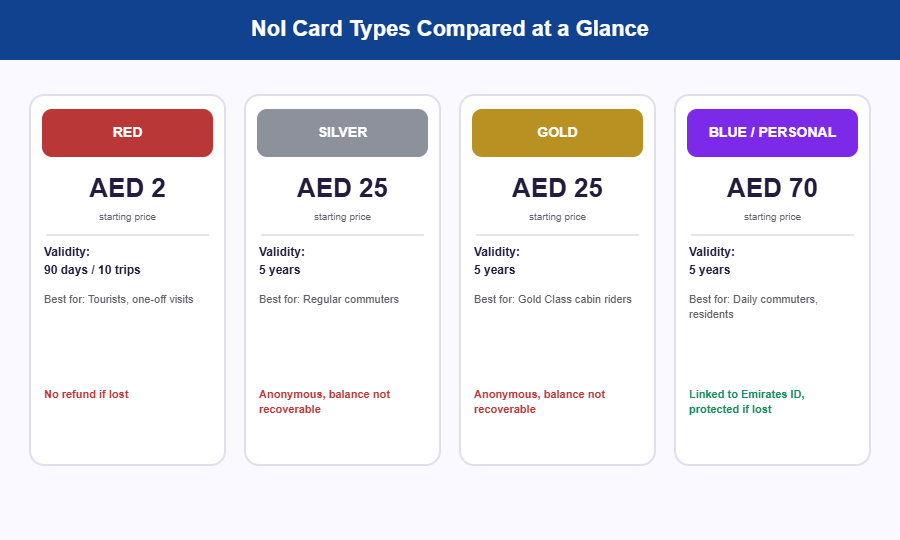
Which card you’re holding changes both what a “normal” balance looks like and what happens if you ever lose it. Here’s how the four main options compare.
| Card Type | Cost | Validity | Best For | If Lost |
|---|---|---|---|---|
| Red Ticket | Around AED 2, short-term journeys | 90 days or a set number of trips | Tourists and one-off visitors | No refund — it’s an anonymous paper ticket |
| Silver | AED 25 (includes AED 19 starting credit) | 5 years | Regular commuters who don’t need Gold Class | Anonymous — balance can’t be recovered |
| Gold | AED 25 (includes AED 19 starting credit) | 5 years | Commuters who use the Gold Class cabin on the Metro | Anonymous — balance can’t be recovered |
| Blue / Personal | AED 70 (includes AED 20 starting credit) | 5 years | Daily commuters and residents who want their balance protected | Linked to an Emirates ID — balance can be recovered |
The Red, Silver and Gold cards are anonymous by design, which is exactly what makes them fast to buy from any machine — but it’s also why RTA can’t refund the balance if one goes missing. If you commute daily and carry any real credit on the card, registering a Personal (Blue) card against your Emirates ID is the one habit that protects the balance if the card is ever lost or stolen.
Understanding “Pending Credit” After a Top-Up
Top up online — through the website, S’hail, or Nol Pay — and the balance often won’t reflect immediately at the gate, even though the app shows the payment went through. In practical terms, the amount is recorded against your account first and only pushed onto the physical card’s chip the next time it’s actually read by RTA hardware, which typically takes anywhere from 45 minutes to around 4 hours. Tapping the card at a Metro gate, a station kiosk, or via NFC in the Nol Pay app forces that sync; a bus validator generally won’t. If you’ve just topped up online and need to travel immediately, the safest move is a quick tap at any station machine first, just to pull the new balance onto the card before you rely on it at a gate.
Topping Up Once You Know the Balance
Minimum top-up amounts differ by channel: ticket offices typically require a minimum of AED 50, while online options through the apps or RTA’s website allow top-ups as low as AED 5 — useful for topping up just enough to clear a single low balance rather than committing a larger amount. Kiosks, ticket offices, authorised retail agents (including many supermarkets and petrol stations across the city), and the apps all accept top-ups, so the right channel usually comes down to whichever is physically or digitally closest at the moment — whether that’s a machine at Business Bay Metro or the app on your phone while you’re still on the couch.
Common Problems and Practical Fixes
- Card rejected at the gate despite showing a balance. The balance has likely dropped below the AED 7.50 minimum required for Metro and Tram access. Top up before attempting to travel again.
- Balance shown in the app doesn’t match what the gate reads. App balances can lag slightly behind the card’s actual chip data immediately after a trip or a top-up; tapping at a station kiosk gives the most current figure.
- SMS to 511 doesn’t reply, or the reply looks wrong. Double-check the Tag ID was typed exactly as printed on the card (no spaces, all 10 digits) and that the message actually sent — delivery can be delayed on some networks during peak hours.
- App says “card not found” or won’t scan via NFC. Confirm the phone’s NFC is switched on and the card is held flat against the back of the device, not the screen. If the card itself is old or physically damaged, a station kiosk reading is more reliable than an NFC scan.
- Lost or stolen card with balance still on it. Only a Personal (Blue) Nol card linked to an Emirates ID protects the remaining balance for recovery. Anonymous Silver or Gold cards cannot be refunded if lost, which is worth knowing before relying on one as a long-term option.
- Confusing a Red Ticket’s limited validity with a reloadable card. Red Tickets expire after 90 days or a set number of journeys and cannot be topped up the same way as Silver, Gold, or Personal cards.
Refunds and Recovering a Lost Card’s Balance
If your Nol card is genuinely lost, stolen, or has stopped working, only a registered Personal (Blue) card gives RTA a way to trace the remaining balance back to you, because it’s tied to your Emirates ID rather than being anonymous. In practice this means reporting the loss to RTA as soon as you notice, either through the app, the website, or by visiting a customer service centre, so the card can be blocked before anyone else uses the balance on it. Anonymous Silver, Gold and Red cards have no such safety net — once one is gone, whatever balance was on it is gone too. If registering a card sounds like extra admin for very little benefit, it’s worth reframing: it’s a one-time step that turns a lost card from a small loss into a recoverable one.
A Note on Safety
Only top up through RTA’s official apps, website, station kiosks, or clearly marked authorised agents. Third-party websites offering to “check your Nol balance” by asking for your card number and personal details are not official RTA channels, and there’s no legitimate reason to enter payment information anywhere outside RTA’s own apps, nol.rta.ae, or the physical station machines.
Frequently Asked Questions
What is the minimum balance needed to use a Nol card on the Dubai Metro?
AED 7.50 is the minimum balance RTA requires before a Nol card will be accepted at a Metro or Tram gate.
Can I check my Nol card balance without an app?
Yes. Any Metro station ticket machine or ticket office, many bus station kiosks, a text to 511, or a call to RTA’s hotline on 800 9090 will all give you the current balance without needing to open an app.
Is there a difference between checking a physical Nol card balance and a digital Nol card balance?
A physical card’s balance can be checked at station kiosks, by SMS, or through the apps, while a digital Nol card set up through Nol Pay only shows its balance inside the app itself, since there’s no physical card to tap at a machine.
Why does my Nol card balance look different in the app than at the gate?
This almost always comes down to timing. A top-up made online can take 45 minutes to 4 hours to sync onto the physical card’s chip, so the app may show a new balance before the gate does. Tapping the card at any station machine forces an update.
What happens if I lose a Nol card with money still on it?
Only a Personal Nol card registered to an Emirates ID allows balance recovery after a loss. Unregistered Silver or Gold cards cannot be refunded, so registering a card you use regularly is worth the small linking step.
How do I check a Nol card balance by SMS?
Send the card’s 10-digit Tag ID (found on the back of the card) as a text message to 511. You’ll receive the current balance by automated reply.
Can I check someone else’s Nol card balance for them?
Yes — balance checks by Tag ID at a station kiosk, on the RTA website, or by SMS don’t require the card to belong to the person checking it, which is why it’s a common way to top up a family member’s card remotely.
Does a Red Ticket work the same way as a Silver or Gold card for balance checks?
You can still tap a Red Ticket at a station kiosk to see what’s left on it, but because it’s a short-validity paper ticket rather than a reloadable card, it won’t appear in the same way inside the RTA apps as a registered Silver, Gold, or Blue card would.
Final Word
Checking a Nol balance takes seconds once you know where to look, whether that’s a quick tap at a station kiosk on the way to work, a text to 511 with no data in sight, or a glance at the S’hail or Nol Pay app before leaving home. Registering a card to an Emirates ID and keeping a small buffer above the AED 7.50 minimum are the two habits that prevent almost every gate rejection commuters run into — and they cost nothing but a few minutes the first time you set them up.
Managing everyday spending in the UAE usually starts with the salary account itself, so see our comparison of the top banks for salary accounts in the UAE if you’re still choosing where to bank. Salaried residents paid through FAB can also check our guide on how to check FAB balance online, while those on a prepaid Ratibi card should see our Ratibi card balance check guide for the same task.
Card prices, credit amounts and validity periods above reflect RTA’s publicly documented Nol card structure as of September 2026. RTA occasionally adjusts fares and top-up limits, so if a figure in-app or on nol.rta.ae ever looks different from what’s written here, treat RTA’s own channels as the final word.